AI in finance can be defined as the employment of artificial intelligence-based technologies to analyze information, find patterns, automate processes, detect anomalies, assist decision-making, and enhance the customer experience. While conventional computer software usually operates in accordance with pre-defined rules set by programmers, AI systems are capable of detecting patterns in the data and leveraging these patterns to generate predictions, classification, recommendations, or other types of output. In financial services, this is valuable since companies often have to deal with substantial amounts of structured and unstructured data. The examples of such data can include transactions, interactions with customers, documents, market data, applications, invoices, emails, and risk indicators. Hence, for firms based in Vancouver, AI in finance can be much more than employing chatbots. Depending on the specific use case, AI can help with detecting fraud, document processing, customer service, financial forecasts, compliance processes, risk assessment, and other internal processes. It should be noted that just because AI is being used in a financial process does not necessarily mean that it is useful. The value of AI in finance depends on the quality of data, workflow design, controls, human supervision, security measures, and alignment with the business problem. How Does AI in Finance Work? In very broad terms, an AI-driven financial system accepts some data as input, performs some calculations via an algorithm or model, outputs something, and then allows a person or another system to do something with that output. A simple flow might look like this: Financial data → Data preparation → AI model → Analysis/Prediction → Action → Monitoring As an example, think about a system whose purpose is to detect any unusual transactions. It starts with transaction data being fed into the system. The data relevant to the problem is then cleaned and prepared. The AI model analyzes the patterns within the data. Any behavior that diverges from the normal pattern is detected by the system. Some kind of risk score or alert is generated. This is then reviewed by a financial expert or some other controlled process. Monitoring and feedback determine if the system is functioning as expected. Of course, each particular solution can have very different architecture. Machine learning, rules, statistics, NLP, computer vision, generative AI and many more are used in combination. What Data Can Financial AI Use? According to use case requirements, AI systems might utilize: Transaction logs Customer data Financial reports Invoices and receipts Loan applications Insurance forms Email communications Market and economy data Account activities Internal company data Data concerning compliance and regulation Sensitive financial data requires special care to be taken. Data access, storage, privacy, cybersecurity, permission, model monitoring, and audit should be taken into account before implementing AI. According to the Government of Canada, the implementation of AI in banking creates opportunities and threats including privacy issues, cybersecurity, misinformation, and fraud. What Technologies Are Used in AI in Finance? However, AI in finance is not one technology only. It is an umbrella term for various technological solutions. Machine Learning Machine learning is able to detect patterns in historical information and make classification or generate predictions based on them. Various financial institutions can use machine learning technology for applications like fraud detection, risk analysis, customer segmentation, and forecasting. Natural Language Processing NLP stands for natural language processing, which means that the software is able to handle human language. The technology can be used by financial institutions for analyzing customer’s messages, extracting information from documents, classifying messages, or providing conversational support. Generative AI Generative AI is capable of generating various types of text, including summaries, explanations, structured information, and other content based on the input information. In the context of finance, some safe applications may include document summarization, internal knowledge assistants, research, and customer service assistant tools. Nevertheless, generative AI can generate wrong information. That is why proper validation and human review process should be established in financial organizations. Computer Vision Computer vision helps to analyze pictures and scanned documents. Among possible applications are information extraction from financial documents, invoices, ID documents, and other types of documents. What Are the Main Uses of AI in Finance? Use cases of AI in finance depend on many factors including firm, regulatory landscape, data availability, and goals. Fraud Detection Fraud detection is among the most frequently mentioned use cases of AI in finance. AI algorithm is capable of assessing the behavior of transactions and detecting anomalies. As opposed to rule-based approach, some systems can take into account several signals at once. For instance, such a system could look at: Transaction frequency Transaction amount Geographical signals Account behavior Device signals Patterns in history Change in usual behavior An alert does not necessarily mean that there was any fraud taking place. It just means that further investigation is necessary. 2. Risk Analysis Various risks should be managed by the financial organizations. AI will help the analysts in working on large sets of data and uncovering relationships which can be hard to uncover through manual work. Some examples include: Credit risk analysis Operational risk management Fraud risk analysis Portfolio analysis Financial forecasting Scenario analysis Human intervention is required where there are serious financial implications involved. 3. Customer Service AI-driven bots can assist in addressing everyday consumer inquiries. For instance, a financial chatbot could assist customers in comprehending: Accounts and procedures Frequently asked questions Services availability General product information Document requirements Basic account support procedures The Financial Consumer Agency of Canada mentions that AI is found in the banking sector in forms of virtual assistants and chatbots. 4. Document Processing Financial firms deal with a lot of documentation. AI can assist in extracting information from: Invoices Statements Applications Contracts Receipts Forms Reports Rather than manually copying all the fields into other systems, an AI-enabled workflow can assist in extracting the required information and sending it into a structured process for verification. It is especially helpful where documentation processes are bogging down the employees. 5. Financial Forecasting Companies can apply AI-assisted forecasting to review past data in order
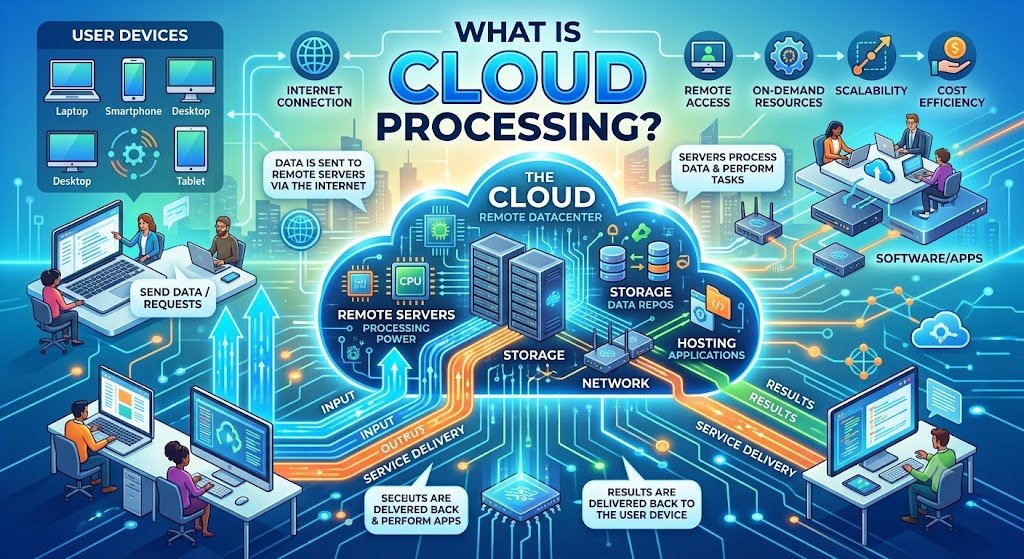
What Is Cloud Processing?
Cloud processing refers to the processing of data, running applications, performing computations, and generating results using external computing resources over the internet rather than fully depending on a computer or an internal server for such activities. Simplified, the idea behind cloud processing is to shift the burden of processing tasks from a single computer by distributing the load across multiple cloud servers, processing the information, and then giving back the desired output. It is directly related to cloud computing, which involves the provision of resources like computational capabilities, storage, databases, networking, software, and analytics over the cloud infrastructure. According to the Government of Canada, cloud computing refers to the delivery of computing services over the internet based on the demand for such resources. Cloud processing can be useful for business applications, websites, analytic services, AI applications, automated tasks, customer portals, and other digital services offered by businesses operating in Vancouver. What Does Cloud Processing Mean? With cloud computing, part or all of the computing needed to fulfill the needs of the application happens on remote infrastructure, and not just on the device of the user. This happens when the document that the user uploads to the application goes through the cloud infrastructure of the application. The cloud infrastructure could then process the file, extract the information from it, make computations or use an AI algorithm before delivering the result. This is a simplified version of how things happen: User/Application → Internet → Cloud Infrastructure → Processing of Data → Result → User/Application It is much more complicated in reality, but this is the fundamental concept. How Does Cloud Processing Work? Cloud processing generally involves several interconnected components. 1. A User or Application Sends a Request The process begins when an application needs computing resources. Examples include: Uploading a document Running an analytics report Processing an image Sending a customer request Running an AI model Generating a business report Performing a database query The request is transmitted to the relevant cloud environment. 2. Cloud Infrastructure Receives the Workload The cloud environment provides access to computing resources such as: Virtual machines Containers CPUs GPUs Memory Storage Databases Networking resources The specific infrastructure depends on the application and workload. 3. The Workload Is Processed Cloud servers perform the required computation. For example, a cloud application might: Analyze customer data Resize an image Process a video Calculate financial information Search a database Run machine-learning inference Generate a report 4. The Result Is Returned After processing is completed, the application receives the result. The user may see: A report A recommendation A processed document A search result An AI-generated response Updated information on a dashboard The user does not necessarily need to know which physical server performed the computation. What Is the Difference Between Cloud Processing and Local Processing? The main difference is where the computing work takes place. Cloud Processing Local Processing Processing occurs on remote infrastructure Processing occurs on the user’s device or local server Resources can be scaled according to workload Resources depend on available local hardware Can support distributed applications Often limited to local infrastructure Internet or network connectivity is commonly required Can often operate without internet Infrastructure is managed through cloud services or providers Organization manages its own hardware or devices Neither approach is automatically suitable for every situation. Some applications benefit from cloud processing, while others may require local or edge processing because of latency, connectivity, privacy, hardware, or operational requirements. What Are the Main Types of Cloud Processing? There are various kinds of cloud processing based on the type of architecture in place. Centralized Cloud Processing The central cloud will perform most of the processing activities in the application. This is a popular approach in web applications, databases, business systems, and central analytics. Distributed Cloud Processing The workload is distributed over various computing sources. This will enable applications to manage bigger workloads or operate at various locations. Serverless Processing The serverless approach enables developers to run the functions of the applications without using the normal servers. The cloud provider will manage most of the infrastructure in such cases while applications run various tasks upon triggering. Cloud-Based AI Processing The AI application can upload the data into cloud infrastructure, and the machine-learning or generative-AI models will do the task of processing the request. It can be very helpful when such AI models need high amounts of computing power which cannot be obtained on usual devices. Hybrid Processing In some cases, there can be both local and cloud processing of certain workloads. Such an approach will help organizations which require a mix of local management, low latency, central processing, and cloud scalability. What Are the Benefits of Cloud Processing? There could be various advantages of cloud processing. Scalability Cloud infrastructure enables organizations to scale computing resources up and down depending on the requirements. For instance, there could be a need to have significantly more computing power during a huge sales day for an e-commerce application than during the quieter periods. Elasticity, as one of the features of cloud computing, is mentioned by The Government of Canada as a way to grow or shrink cloud resources depending on the requirements. Flexible Computing Resources An organization can acquire computing resources without having to acquire and maintain all the infrastructure needed for it. Support for Remote Applications Cloud processing enables applications and services to run across distributed environments. It is helpful for organizations with remote employees, offices, customers in other regions, and online services. Faster Deployment Cloud infrastructure provides access to computing, storage, networking and other services which developers can utilize when building applications. Potential Cost Efficiency Cloud services allow avoiding the necessity to purchase infrastructure for each potential peak load. However, cloud computing does not mean cost reduction. It depends on architecture, resource utilization, storage, data transfers, licensing, monitoring and other elements. Support for Large Workloads Cloud environment provides the possibility Cloud Processing vs Cloud Storage Cloud computing and cloud storage are similar but different concepts. Cloud storage is storing data
How Can AI Automate Business Tasks?
AI automates business tasks by handling repetitive processes such as data entry, lead qualification, customer support, appointment scheduling, email follow-ups, document processing, reporting, and workflow management. By connecting AI with existing business tools, companies can reduce manual work, improve accuracy, respond faster, and increase overall productivity while allowing employees to focus on more strategic tasks. What Business Tasks Can AI Automate? How Can AI Automate Business Tasks? Common applications include: Lead management: Capture, qualify, score, and route leads automatically. Customer support: Use AI chatbots to answer common questions and escalate complex requests. Data processing: Extract information from documents, emails, forms, and invoices. Marketing automation: Personalize campaigns, generate content, segment audiences, and automate follow-ups. Sales workflows: Schedule meetings, update CRM records, send reminders, and manage follow-ups. Reporting: Collect business data and generate recurring reports and summaries. Administrative work: Automate notifications, approvals, task assignments, and repetitive data entry. For businesses exploring broader AI adoption, our AI solutions Vancouver service can help connect AI capabilities with real business objectives. How Can AI Automation Improve Business Efficiency? How Can AI Automate Business Tasks? The biggest advantage is not simply replacing manual work. It is creating consistent workflows that operate faster and with fewer unnecessary steps. AI automation can help businesses reduce repetitive workload, respond to customers faster, improve data accuracy, and give teams more visibility into ongoing operations. It can also scale routine processes as the business grows without requiring the same increase in administrative effort. Canada is actively encouraging responsible AI adoption among businesses. The Government of Canada’s current AI strategy highlights productivity, SME adoption, responsible AI, and practical implementation as important priorities. What AI Automation Services Can Global Tech Mind Provide? How Can AI Automate Business Tasks? Global Tech Mind develops customized automation workflows based on how a business actually operates. Our services can include: AI workflow automation CRM and lead automation AI-powered customer support Chatbot development Document and data automation Email and notification automation AI-powered reporting Business process integration Custom AI applications API and software integrations Businesses looking for specialized workflow implementation can explore our AI automation services Vancouver offering. How Does AI Automation Work? How Can AI Automate Business Tasks? A typical implementation starts by identifying repetitive processes and measuring where automation can create measurable value. What Is the AI Automation Process? Process discovery: Identify repetitive and inefficient tasks. Automation planning: Select suitable AI tools, integrations, and workflows. Development: Build and connect the required automation. Testing: Check accuracy, reliability, security, and workflow performance. Deployment: Introduce the automation into daily operations. Optimization: Monitor results and continuously improve the workflow. This approach helps businesses adopt AI progressively rather than investing in unnecessary technology. Which Industries Can Benefit From AI Automation? How Can AI Automate Business Tasks? Almost any organization with repetitive digital processes can benefit. Common applications include healthcare, professional services, education, real estate, ecommerce, finance, logistics, hospitality, recruitment, and retail. For businesses that need automated customer conversations, Global Tech Mind also provides chatbot development company Vancouver solutions for websites, customer service, lead generation, and support workflows. Why Choose Global Tech Mind for AI Automation? How Can AI Automate Business Tasks? Global Tech Mind focuses on practical, business-specific automation rather than one-size-fits-all solutions. We combine software development, AI integration, workflow design, and business process understanding to create solutions aligned with your goals. Our focus is simple: automate the right tasks, integrate the right systems, and create measurable operational value. What Should Vancouver Businesses Automate First? Start with tasks that are repetitive, rules-driven, high-volume, time-consuming, or prone to human error. Lead follow-ups, customer FAQs, appointment scheduling, document processing, reporting, and CRM updates are often strong starting points. Conclusion: How Can AI Automate Business Tasks Effectively? How Can AI Automate Business Tasks? The most effective approach is to identify specific operational bottlenecks and automate them with a measurable business objective. For Vancouver companies, AI can become a practical productivity tool—not just an experimental technology. Global Tech Mind can help you evaluate your processes, design AI-powered workflows, integrate your existing systems, and build automation around your business needs. Ready to automate repetitive business work? Contact Global Tech Mind to discuss your AI automation requirements. FAQs How Can AI Automate Business Tasks for Small Businesses? AI can automate customer inquiries, lead qualification, appointment scheduling, document processing, email follow-ups, reporting, and other repetitive workflows. Is AI Automation Suitable for Vancouver Small Businesses? Yes. Small businesses can begin with one or two high-value processes and expand automation as they see measurable improvements. Can AI Automation Integrate With Existing Business Software? Yes. Depending on the software, AI workflows can connect through APIs, webhooks, databases, CRM integrations, and other integration methods. Can AI Automate Customer Support? Yes. AI chatbots can answer frequently asked questions, collect customer information, assist with basic requests, and transfer complex conversations to human teams. AI can automate customer inquiries, lead qualification, appointment scheduling, document processing, email follow-ups, reporting, and other repetitive workflows. Yes. Small businesses can begin with one or two high-value processes and expand automation as they see measurable improvements. Yes. Depending on the software, AI workflows can connect through APIs, webhooks, databases, CRM integrations, and other integration methods. Yes. AI chatbots can answer frequently asked questions, collect customer information, assist with basic requests, and transfer complex conversations to human teams.