
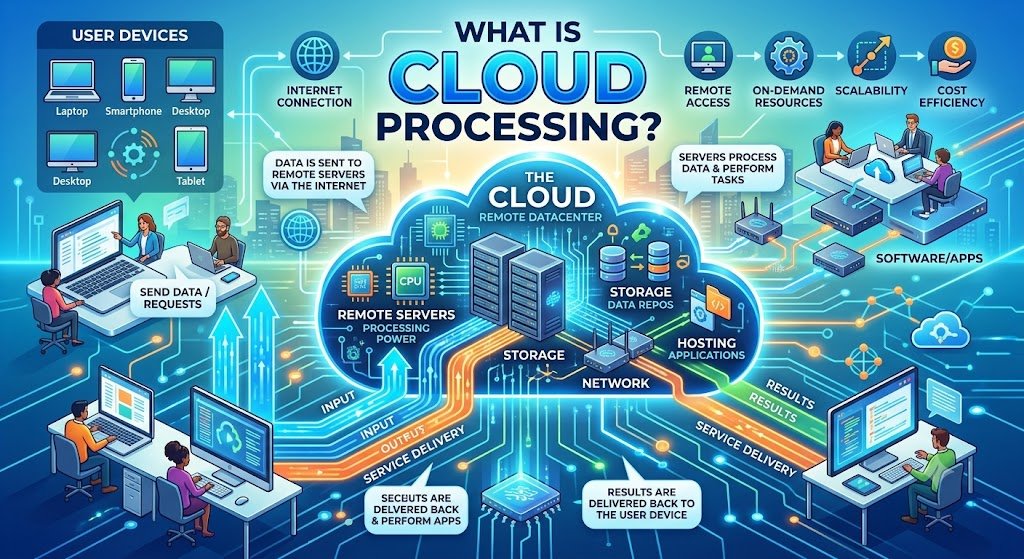
Cloud processing refers to the processing of data, running applications, performing computations, and generating results using external computing resources over the internet rather than fully depending on a computer or an internal server for such activities.
Simplified, the idea behind cloud processing is to shift the burden of processing tasks from a single computer by distributing the load across multiple cloud servers, processing the information, and then giving back the desired output.
It is directly related to cloud computing, which involves the provision of resources like computational capabilities, storage, databases, networking, software, and analytics over the cloud infrastructure. According to the Government of Canada, cloud computing refers to the delivery of computing services over the internet based on the demand for such resources.
Cloud processing can be useful for business applications, websites, analytic services, AI applications, automated tasks, customer portals, and other digital services offered by businesses operating in Vancouver.
What Does Cloud Processing Mean?
With cloud computing, part or all of the computing needed to fulfill the needs of the application happens on remote infrastructure, and not just on the device of the user.
This happens when the document that the user uploads to the application goes through the cloud infrastructure of the application. The cloud infrastructure could then process the file, extract the information from it, make computations or use an AI algorithm before delivering the result.
This is a simplified version of how things happen:
User/Application → Internet → Cloud Infrastructure → Processing of Data → Result → User/Application
It is much more complicated in reality, but this is the fundamental concept.
How Does Cloud Processing Work?
Cloud processing generally involves several interconnected components.
1. A User or Application Sends a Request
The process begins when an application needs computing resources.
Examples include:
- Uploading a document
- Running an analytics report
- Processing an image
- Sending a customer request
- Running an AI model
- Generating a business report
- Performing a database query
The request is transmitted to the relevant cloud environment.
2. Cloud Infrastructure Receives the Workload
The cloud environment provides access to computing resources such as:
- Virtual machines
- Containers
- CPUs
- GPUs
- Memory
- Storage
- Databases
- Networking resources
The specific infrastructure depends on the application and workload.
3. The Workload Is Processed
Cloud servers perform the required computation.
For example, a cloud application might:
- Analyze customer data
- Resize an image
- Process a video
- Calculate financial information
- Search a database
- Run machine-learning inference
- Generate a report
4. The Result Is Returned
After processing is completed, the application receives the result.
The user may see:
- A report
- A recommendation
- A processed document
- A search result
- An AI-generated response
- Updated information on a dashboard
The user does not necessarily need to know which physical server performed the computation.
What Is the Difference Between Cloud Processing and Local Processing?
The main difference is where the computing work takes place.
Cloud Processing | Local Processing |
Processing occurs on remote infrastructure | Processing occurs on the user’s device or local server |
Resources can be scaled according to workload | Resources depend on available local hardware |
Can support distributed applications | Often limited to local infrastructure |
Internet or network connectivity is commonly required | Can often operate without internet |
Infrastructure is managed through cloud services or providers | Organization manages its own hardware or devices |
Neither approach is automatically suitable for every situation.
Some applications benefit from cloud processing, while others may require local or edge processing because of latency, connectivity, privacy, hardware, or operational requirements.
What Are the Main Types of Cloud Processing?
There are various kinds of cloud processing based on the type of architecture in place.
Centralized Cloud Processing
The central cloud will perform most of the processing activities in the application.
This is a popular approach in web applications, databases, business systems, and central analytics.
Distributed Cloud Processing
The workload is distributed over various computing sources.
This will enable applications to manage bigger workloads or operate at various locations.
Serverless Processing
The serverless approach enables developers to run the functions of the applications without using the normal servers.
The cloud provider will manage most of the infrastructure in such cases while applications run various tasks upon triggering.
Cloud-Based AI Processing
The AI application can upload the data into cloud infrastructure, and the machine-learning or generative-AI models will do the task of processing the request.
It can be very helpful when such AI models need high amounts of computing power which cannot be obtained on usual devices.
Hybrid Processing
In some cases, there can be both local and cloud processing of certain workloads.
Such an approach will help organizations which require a mix of local management, low latency, central processing, and cloud scalability.
What Are the Benefits of Cloud Processing?
There could be various advantages of cloud processing.
Scalability
Cloud infrastructure enables organizations to scale computing resources up and down depending on the requirements.
For instance, there could be a need to have significantly more computing power during a huge sales day for an e-commerce application than during the quieter periods.
Elasticity, as one of the features of cloud computing, is mentioned by The Government of Canada as a way to grow or shrink cloud resources depending on the requirements.
Flexible Computing Resources
An organization can acquire computing resources without having to acquire and maintain all the infrastructure needed for it.
Support for Remote Applications
Cloud processing enables applications and services to run across distributed environments.
It is helpful for organizations with remote employees, offices, customers in other regions, and online services.
Faster Deployment
Cloud infrastructure provides access to computing, storage, networking and other services which developers can utilize when building applications.
Potential Cost Efficiency
Cloud services allow avoiding the necessity to purchase infrastructure for each potential peak load.
However, cloud computing does not mean cost reduction. It depends on architecture, resource utilization, storage, data transfers, licensing, monitoring and other elements.
Support for Large Workloads
Cloud environment provides the possibility
Cloud Processing vs Cloud Storage
Cloud computing and cloud storage are similar but different concepts.
Cloud storage is storing data in remote infrastructure.
Cloud computing is performing computations on remote computing resources on stored data.
Examples include:
An organization can keep customers’ documents in cloud storage and then use cloud computing to process these documents.
Both services can be used in tandem.
How Is Cloud Processing Used in AI?
Modern AI applications frequently depend on cloud processing.
An AI application may require significant computing resources for:
- Model training
- Model inference
- Data preparation
- Vector search
- Document processing
- Image analysis
- Speech processing
- Natural language processing
For example, a business chatbot may receive a customer question, send the request to cloud-based AI infrastructure, process the response, retrieve relevant business information, and return the answer to the customer.
Cloud processing can make these capabilities accessible without requiring every business to maintain its own specialized AI infrastructure.
Businesses exploring AI applications in Vancouver can also review AI solutions in Vancouver to understand how cloud-based AI technologies can fit into broader software and business workflows.
How Does Cloud Processing Support Business Automation?
Cloud processing is also important for workflow automation.
A typical automated process might look like:
Customer Request → Cloud Application → Data Processing → Business Logic → CRM/Database → Automated Action
For example, a business could receive a form submission.
The cloud-based workflow could:
- Receive the submission.
- Validate the information.
- Classify the request.
- Store the data.
- Update a CRM.
- Send a notification.
- Assign the request to an employee.
- Generate a follow-up task.
This type of architecture can connect multiple business systems without requiring employees to manually transfer information between them.
For organizations looking at this use case, AI automation services in Vancouver can be relevant when AI capabilities are combined with cloud-based workflow automation.
What Industries Use Cloud Processing?
Cloud processing is used across many industries.
Healthcare
Potential applications include:
- Digital health platforms
- Administrative systems
- Data analysis
- Appointment systems
- Document processing
- Research workloads
Sensitive healthcare information requires appropriate privacy, security, access-control, and regulatory safeguards.
Finance
Cloud processing can support:
- Transaction analysis
- Fraud monitoring
- Financial reporting
- Customer applications
- Risk analysis
- Data processing
Retail and E-commerce
Retail businesses can use cloud infrastructure for:
- Online stores
- Product catalogs
- Recommendation systems
- Customer analytics
- Inventory applications
- Order processing
Manufacturing
Cloud processing can support:
- Production analytics
- Predictive maintenance
- Supply-chain systems
- Quality monitoring
- Inventory management
Professional Services
Professional organizations can use cloud applications for:
- Document management
- Collaboration
- Customer portals
- Reporting
- Workflow automation
- Knowledge management
What Is Cloud Processing in Vancouver Business Applications?
Vancouver businesses can use cloud processing in both customer-facing and internal systems.
Examples include:
Cloud-Based CRM
Customer information can be processed and synchronized across sales and support workflows.
Online Business Portals
Customers, employees, suppliers, or partners can access applications through web-based interfaces.
Data Analytics
Cloud infrastructure can process business information and generate dashboards and reports.
AI Applications
Cloud resources can support AI assistants, document processing, recommendation systems, and other intelligent applications.
Workflow Automation
Cloud-based workflows can connect forms, databases, CRM systems, email platforms, accounting tools, and other applications.
The right architecture depends on the business process, data requirements, security model, expected workload, budget, and performance requirements.
What Is the Cloud Processing Process?
A practical cloud-processing implementation can follow several stages.
Step 1: Define the Workload
Start by identifying exactly what needs to be processed.
Ask:
- What data is involved?
- How frequently does processing occur?
- How much data is involved?
- How quickly must the result be available?
- Who needs access?
Step 2: Evaluate Data Requirements
Determine whether the information contains:
- Personal data
- Financial information
- Confidential business information
- Customer information
- Intellectual property
- Regulated information
This helps determine appropriate security and hosting requirements.
Step 3: Choose the Processing Architecture
Possible approaches include:
- Public cloud
- Private cloud
- Hybrid cloud
- Serverless architecture
- Containerized workloads
- Dedicated infrastructure
- Edge and cloud combinations
Step 4: Build the Application
Develop the required software, APIs, databases, integrations, and processing logic.
Step 5: Secure the Environment
Security measures can include:
- Identity and access management
- Encryption
- Network controls
- Monitoring
- Backups
- Logging
- Vulnerability management
Step 6: Test Performance
Test the system under normal and peak workloads.
Measure:
- Response time
- Processing speed
- Reliability
- Resource usage
- Error rates
- Cost
Step 7: Monitor and Improve
Cloud applications should be monitored after deployment.
Usage patterns can change over time, so organizations may need to adjust resources, architecture, security controls, or processing workflows.
What Should Businesses Consider Before Using Cloud Processing?
Before moving a workload to the cloud, consider more than just computing capacity.
Security
Determine who can access the data and how access will be controlled.
Privacy
Understand how personal or confidential information will be handled.
Data Residency
Identify where information is stored and processed and whether contractual or regulatory requirements apply.
Performance
Consider latency, bandwidth, workload size, and geographic distribution.
Reliability
Plan for failures, backups, recovery, and service interruptions.
Cost Management
Track computing, storage, network transfer, software, and monitoring costs.
Integration
Check whether the cloud environment can communicate reliably with existing systems.
The Government of Canada’s cloud guidance identifies security, privacy, data residency, sovereignty, latency, performance, data transfer, integration, and vendor lock-in among considerations when evaluating cloud services.
Cloud Processing and Data Security in Canada
Cloud processing requires careful consideration of data governance.
The Government of Canada’s current application-hosting strategy recognizes both cloud hosting and government-owned data centres as possible hosting approaches and states that the appropriate choice should depend on application needs and business value.
Canada is also investing in domestic data-centre capacity. In September 2026, the federal government announced Responsible Data Centre Development Principles covering issues including local benefits, electricity costs, water use, environmental impacts, transparency, and strategic value. The announcement also noted that data centres support cloud computing and AI infrastructure.
These developments illustrate why cloud processing is not only a software issue. Infrastructure, security, privacy, location, governance, and operational requirements can all influence architectural decisions.
Cloud Processing vs Edge Processing
Cloud and edge processing solve different problems.
Cloud processing sends workloads to centralized or distributed cloud infrastructure.
Edge processing performs computation closer to where data is generated.
For example, an industrial sensor may process time-sensitive information locally while sending selected information to the cloud for longer-term analysis.
A hybrid architecture can therefore use both approaches:
Device/Sensor → Edge Processing → Cloud Processing → Analytics
This can reduce latency while retaining the benefits of centralized cloud resources.
How Can a Business Start Using Cloud Processing?
A business does not need to move everything to the cloud at once.
A sensible approach is to start with one workload.
For example:
Current Process: Employees manually process customer documents.
Potential Cloud Process: Documents are uploaded to a secure cloud application, processed automatically, stored in a database, and routed to the appropriate employee.
The business can then compare:
- Processing time
- Manual effort
- Error rates
- Infrastructure costs
- User experience
- Security requirements
If the results justify expansion, additional workloads can be migrated or redesigned.
Why Choose a Structured Approach to Cloud Processing?
Cloud processing works best when technology choices are connected to a real business requirement.
A structured approach considers:
- Business objectives
- Existing applications
- Data requirements
- Security
- Privacy
- Performance
- Scalability
- Integration
- Cost
- Long-term maintenance
This avoids the common mistake of selecting cloud technology first and trying to find a business problem for it afterward.
Conclusion
So, what is cloud processing? It is the use of remote computing infrastructure to process data, run applications, perform calculations, and deliver results through network-connected services.
Cloud processing can provide scalable computing resources, support modern web and AI applications, simplify access to infrastructure, and enable businesses to connect different digital systems.
However, cloud processing is not simply about moving data to another server. Organizations also need to consider security, privacy, performance, data residency, reliability, integration, cost, and long-term architecture.
For Vancouver businesses, the most practical starting point is usually a clearly defined workload or business process. By evaluating one use case, measuring the results, and expanding gradually, organizations can determine where cloud processing provides genuine operational value.
The best cloud architecture is not necessarily the one with the most technology. It is the one that meets the application’s requirements while balancing performance, security, scalability, cost, and maintainability.
Frequently Asked Questions
What is cloud processing in simple terms?
Cloud processing means using remote servers and computing infrastructure to process data or run applications instead of relying entirely on a local computer or on-premises server.
How does cloud processing work?
An application sends a request or workload through a network to cloud infrastructure. Cloud computing resources process the information, and the resulting data or response is returned to the application or user.
What is the difference between cloud processing and cloud storage?
Cloud storage is primarily used to store information on remote infrastructure, while cloud processing uses computing resources to perform operations on information. Many modern applications use both.
. Is cloud processing secure?
Cloud processing can be designed with strong security controls, but security depends on the cloud provider, architecture, configuration, access controls, encryption, monitoring, application security, and the organization’s own practices.